Marketers
A shared team for strategy, copy, design and campaigns, every month.
Website developmentCapability pages, useful proof and a direct path to an enquiry.
BrandingPositioning, identity and sales material that explain why you're worth choosing.
SEO and AI searchGet found on Google and in AI answers by the people who buy what you make.
Performance marketingGoogle, LinkedIn and Meta ads measured on qualified enquiries.
AI automation & CRMEvery enquiry gets an owner and a next step, with human review.
 Two minutes, no email neededFind the one thing to fix firstTake the quiz→
A B2B Website Launch Checklist for Forms, Search and Measurement
Test forms, redirects, search access and lead measurement before a B2B website launch, with clear owners and checks after the site goes live.
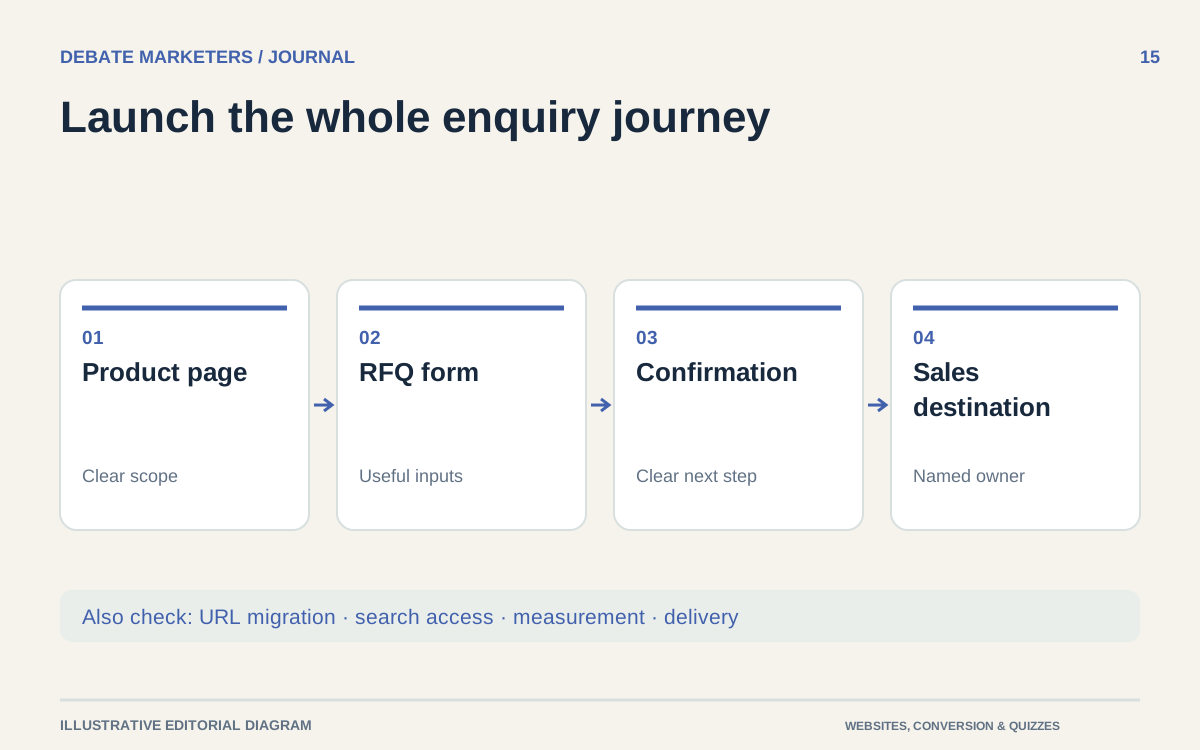
The homepage looks ready. The launch can still fail where it matters: a quote request reaches an unmonitored inbox, a useful old URL stops working or a button click is reported as a new lead.
A B2B launch review should follow the buyer's journey and the team's operating process. Treat the checklist as a set of tests with owners and evidence, not a collection of boxes someone can tick from memory.
Use these checkpoints before and immediately after the public switch.
1. Agree what is launching
Record the pages, domains, forms, integrations and downloadable files included in the release. Identify anything deliberately deferred. Confirm which product claims and purchasing information have received business and technical approval.
Name one launch coordinator and an owner for each critical area. Include the person who can make the go-or-no-go decision if a test fails. A supplier saying its part is ready does not establish that the whole buyer journey works.
Keep a restorable version of the previous release and document how a rollback would work. Account for submissions received during the launch window so a rollback does not quietly lose new inquiries.
2. Submit every important form
Use approved test details and clearly identify test inquiries. Check required fields, optional fields, conditional branches, confirmation messages and failure states. Include uploads if the form accepts them.
Follow each submission to its destination. Confirm the notification arrives, the assigned person can see it and any CRM record contains the intended information. Check a backup route if delivery or an integration fails.
Test mobile and keyboard use, including correcting an error. W3C's guidance emphasizes feedback that helps users identify and resolve form problems. W3C user notification guidance
Do not accept a successful button animation as proof that the request was received.
3. Protect useful existing URLs
If URLs are changing, maintain a map from important old pages and files to their appropriate destinations. Include product sheets and other downloads that may have been shared directly with buyers.
Google's migration guidance covers URL mapping, redirects, updated links and sitemaps, and removing development-only indexing blocks. Use it as a technical reference for a URL-changing launch. Google's site-move guidance
Test the actual redirects after deployment. A request should reach the relevant replacement rather than an unrelated homepage. Confirm the destination works and that internal navigation no longer relies on unnecessary redirects.
For retired material without an equivalent replacement, agree the appropriate treatment with the website team instead of inventing a misleading substitute.
4. Check search access deliberately
Make a list of public pages intended for search and any areas intended to remain private or excluded. Have the technical owner verify that the production setup matches those decisions.
Review page titles, canonical references, internal links and the production sitemap. Confirm that navigation leads to the important product and capability pages. Inspect representative templates as well as a few individually important URLs.
Search Console's URL Inspection distinguishes indexed information from a live test. Use the appropriate view, and do not treat a passing live test as a promise of search visibility. Google's URL Inspection documentation
Keep confidential material behind appropriate access controls. Search exclusion alone should not be treated as protection for private information.
5. Verify what measurement actually records
Write a short event list with plain-language definitions. Separate opening a form, attempting submission, accepted submission and later sales qualification. These are different actions with different business meanings.
Google Analytics lists generate_lead as a recommended event for form submissions or information requests. The implementation still needs to match the event you intend to measure. Google Analytics recommended events
Test each event and look for duplicate firing, missing events and internal test activity. Compare an accepted test inquiry with its event record. Document known gaps instead of assuming browser measurement captures every request.
Keep personal details out of analytics event values, page titles and URLs. Google's Analytics guidance prohibits sending data it can recognize as personally identifiable information. Google Analytics PII guidance
Have the responsible owner review privacy and consent behavior for the site's audience and configuration.
6. Recheck the production journey
Repeat the critical tests on the public site after launch. Staging success does not prove that production permissions, destinations and configuration are correct.
Verify the contact routes, forms, downloads, redirects and measurement. Keep an issue log with severity, owner and resolution evidence. Prioritize anything that loses inquiries, exposes information or sends buyers to the wrong place.
Plan subsequent checks around incoming inquiries, technical observations and the site's normal traffic. Give someone responsibility for reviewing them. A launch is ready to leave close supervision when the critical journeys are verified and remaining issues have clear ownership.
Talk with Debate Marketers about coordinating website, content and measurement work through a shared, multidisciplinary managed team.
We plan and run admissions campaigns, websites, SEO and AI search, ads and CRM follow-up for schools, manufacturers and growing brands, from teams in New Delhi and Malta.
Published 3 October 2026.
More articles

How to Find Buyers for Export: Marketing and Branding That Win Orders
How import and export companies find buyers in 2026: buyer finder tools, trade data, B2B portals, LinkedIn and AI search, and the branding that wins orders.

AEO and GEO Best Practices for 2026: A Guide for B2B and Retail
What Google, Microsoft and OpenAI say about AEO and GEO, what studies show gets cited, and best practices for B2B pages, product feeds and measurement in 2026.

How to Choose an SEO Agency in 2026: A B2B and Retail Checklist
What to ask an SEO agency, how to score proposals, what AEO and GEO work should cover, what SEO costs in 2026 and the contract terms to agree before signing.
A B2B Website Launch Checklist for Forms, Search and Measurement
Test forms, redirects, search access and lead measurement before a B2B website launch, with clear owners and checks after the site goes live.
The homepage looks ready. The launch can still fail where it matters: a quote request reaches an unmonitored inbox, a useful old URL stops working or a button click is reported as a new lead.
A B2B launch review should follow the buyer's journey and the team's operating process. Treat the checklist as a set of tests with owners and evidence, not a collection of boxes someone can tick from memory.
Use these checkpoints before and immediately after the public switch.
1. Agree what is launching
Record the pages, domains, forms, integrations and downloadable files included in the release. Identify anything deliberately deferred. Confirm which product claims and purchasing information have received business and technical approval.
Name one launch coordinator and an owner for each critical area. Include the person who can make the go-or-no-go decision if a test fails. A supplier saying its part is ready does not establish that the whole buyer journey works.
Keep a restorable version of the previous release and document how a rollback would work. Account for submissions received during the launch window so a rollback does not quietly lose new inquiries.
2. Submit every important form
Use approved test details and clearly identify test inquiries. Check required fields, optional fields, conditional branches, confirmation messages and failure states. Include uploads if the form accepts them.
Follow each submission to its destination. Confirm the notification arrives, the assigned person can see it and any CRM record contains the intended information. Check a backup route if delivery or an integration fails.
Test mobile and keyboard use, including correcting an error. W3C's guidance emphasizes feedback that helps users identify and resolve form problems. W3C user notification guidance
Do not accept a successful button animation as proof that the request was received.
3. Protect useful existing URLs
If URLs are changing, maintain a map from important old pages and files to their appropriate destinations. Include product sheets and other downloads that may have been shared directly with buyers.
Google's migration guidance covers URL mapping, redirects, updated links and sitemaps, and removing development-only indexing blocks. Use it as a technical reference for a URL-changing launch. Google's site-move guidance
Test the actual redirects after deployment. A request should reach the relevant replacement rather than an unrelated homepage. Confirm the destination works and that internal navigation no longer relies on unnecessary redirects.
For retired material without an equivalent replacement, agree the appropriate treatment with the website team instead of inventing a misleading substitute.
4. Check search access deliberately
Make a list of public pages intended for search and any areas intended to remain private or excluded. Have the technical owner verify that the production setup matches those decisions.
Review page titles, canonical references, internal links and the production sitemap. Confirm that navigation leads to the important product and capability pages. Inspect representative templates as well as a few individually important URLs.
Search Console's URL Inspection distinguishes indexed information from a live test. Use the appropriate view, and do not treat a passing live test as a promise of search visibility. Google's URL Inspection documentation
Keep confidential material behind appropriate access controls. Search exclusion alone should not be treated as protection for private information.
5. Verify what measurement actually records
Write a short event list with plain-language definitions. Separate opening a form, attempting submission, accepted submission and later sales qualification. These are different actions with different business meanings.
Google Analytics lists generate_lead as a recommended event for form submissions or information requests. The implementation still needs to match the event you intend to measure. Google Analytics recommended events
Test each event and look for duplicate firing, missing events and internal test activity. Compare an accepted test inquiry with its event record. Document known gaps instead of assuming browser measurement captures every request.
Keep personal details out of analytics event values, page titles and URLs. Google's Analytics guidance prohibits sending data it can recognize as personally identifiable information. Google Analytics PII guidance
Have the responsible owner review privacy and consent behavior for the site's audience and configuration.
6. Recheck the production journey
Repeat the critical tests on the public site after launch. Staging success does not prove that production permissions, destinations and configuration are correct.
Verify the contact routes, forms, downloads, redirects and measurement. Keep an issue log with severity, owner and resolution evidence. Prioritize anything that loses inquiries, exposes information or sends buyers to the wrong place.
Plan subsequent checks around incoming inquiries, technical observations and the site's normal traffic. Give someone responsibility for reviewing them. A launch is ready to leave close supervision when the critical journeys are verified and remaining issues have clear ownership.
Talk with Debate Marketers about coordinating website, content and measurement work through a shared, multidisciplinary managed team.
We plan and run admissions campaigns, websites, SEO and AI search, ads and CRM follow-up for schools, manufacturers and growing brands, from teams in New Delhi and Malta.
Published 3 October 2026.
More articles
How to Find Buyers for Export: Marketing and Branding That Win Orders
How import and export companies find buyers in 2026: buyer finder tools, trade data, B2B portals, LinkedIn and AI search, and the branding that wins orders.
AEO and GEO Best Practices for 2026: A Guide for B2B and Retail
What Google, Microsoft and OpenAI say about AEO and GEO, what studies show gets cited, and best practices for B2B pages, product feeds and measurement in 2026.
How to Choose an SEO Agency in 2026: A B2B and Retail Checklist
What to ask an SEO agency, how to score proposals, what AEO and GEO work should cover, what SEO costs in 2026 and the contract terms to agree before signing.
A B2B Website Launch Checklist for Forms, Search and Measurement
Test forms, redirects, search access and lead measurement before a B2B website launch, with clear owners and checks after the site goes live.
The homepage looks ready. The launch can still fail where it matters: a quote request reaches an unmonitored inbox, a useful old URL stops working or a button click is reported as a new lead.
A B2B launch review should follow the buyer's journey and the team's operating process. Treat the checklist as a set of tests with owners and evidence, not a collection of boxes someone can tick from memory.
Use these checkpoints before and immediately after the public switch.
1. Agree what is launching
Record the pages, domains, forms, integrations and downloadable files included in the release. Identify anything deliberately deferred. Confirm which product claims and purchasing information have received business and technical approval.
Name one launch coordinator and an owner for each critical area. Include the person who can make the go-or-no-go decision if a test fails. A supplier saying its part is ready does not establish that the whole buyer journey works.
Keep a restorable version of the previous release and document how a rollback would work. Account for submissions received during the launch window so a rollback does not quietly lose new inquiries.
2. Submit every important form
Use approved test details and clearly identify test inquiries. Check required fields, optional fields, conditional branches, confirmation messages and failure states. Include uploads if the form accepts them.
Follow each submission to its destination. Confirm the notification arrives, the assigned person can see it and any CRM record contains the intended information. Check a backup route if delivery or an integration fails.
Test mobile and keyboard use, including correcting an error. W3C's guidance emphasizes feedback that helps users identify and resolve form problems. W3C user notification guidance
Do not accept a successful button animation as proof that the request was received.
3. Protect useful existing URLs
If URLs are changing, maintain a map from important old pages and files to their appropriate destinations. Include product sheets and other downloads that may have been shared directly with buyers.
Google's migration guidance covers URL mapping, redirects, updated links and sitemaps, and removing development-only indexing blocks. Use it as a technical reference for a URL-changing launch. Google's site-move guidance
Test the actual redirects after deployment. A request should reach the relevant replacement rather than an unrelated homepage. Confirm the destination works and that internal navigation no longer relies on unnecessary redirects.
For retired material without an equivalent replacement, agree the appropriate treatment with the website team instead of inventing a misleading substitute.
4. Check search access deliberately
Make a list of public pages intended for search and any areas intended to remain private or excluded. Have the technical owner verify that the production setup matches those decisions.
Review page titles, canonical references, internal links and the production sitemap. Confirm that navigation leads to the important product and capability pages. Inspect representative templates as well as a few individually important URLs.
Search Console's URL Inspection distinguishes indexed information from a live test. Use the appropriate view, and do not treat a passing live test as a promise of search visibility. Google's URL Inspection documentation
Keep confidential material behind appropriate access controls. Search exclusion alone should not be treated as protection for private information.
5. Verify what measurement actually records
Write a short event list with plain-language definitions. Separate opening a form, attempting submission, accepted submission and later sales qualification. These are different actions with different business meanings.
Google Analytics lists generate_lead as a recommended event for form submissions or information requests. The implementation still needs to match the event you intend to measure. Google Analytics recommended events
Test each event and look for duplicate firing, missing events and internal test activity. Compare an accepted test inquiry with its event record. Document known gaps instead of assuming browser measurement captures every request.
Keep personal details out of analytics event values, page titles and URLs. Google's Analytics guidance prohibits sending data it can recognize as personally identifiable information. Google Analytics PII guidance
Have the responsible owner review privacy and consent behavior for the site's audience and configuration.
6. Recheck the production journey
Repeat the critical tests on the public site after launch. Staging success does not prove that production permissions, destinations and configuration are correct.
Verify the contact routes, forms, downloads, redirects and measurement. Keep an issue log with severity, owner and resolution evidence. Prioritize anything that loses inquiries, exposes information or sends buyers to the wrong place.
Plan subsequent checks around incoming inquiries, technical observations and the site's normal traffic. Give someone responsibility for reviewing them. A launch is ready to leave close supervision when the critical journeys are verified and remaining issues have clear ownership.
Talk with Debate Marketers about coordinating website, content and measurement work through a shared, multidisciplinary managed team.
We plan and run admissions campaigns, websites, SEO and AI search, ads and CRM follow-up for schools, manufacturers and growing brands, from teams in New Delhi and Malta.
Published 3 October 2026.
More articles
How to Find Buyers for Export: Marketing and Branding That Win Orders
How import and export companies find buyers in 2026: buyer finder tools, trade data, B2B portals, LinkedIn and AI search, and the branding that wins orders.
AEO and GEO Best Practices for 2026: A Guide for B2B and Retail
What Google, Microsoft and OpenAI say about AEO and GEO, what studies show gets cited, and best practices for B2B pages, product feeds and measurement in 2026.
How to Choose an SEO Agency in 2026: A B2B and Retail Checklist
What to ask an SEO agency, how to score proposals, what AEO and GEO work should cover, what SEO costs in 2026 and the contract terms to agree before signing.
Bring your first priority.
Bring one problem: a brand that's drifted, a website that doesn't sell or enquiries going nowhere. We'll spend 30 minutes finding the first fix.
Projects & shared-team retainers
Bring your first priority.
Bring one problem: a brand that's drifted, a website that doesn't sell or enquiries going nowhere. We'll spend 30 minutes finding the first fix.
Projects & shared-team retainers