Marketers
A shared team for strategy, copy, design and campaigns, every month.
Website developmentCapability pages, useful proof and a direct path to an enquiry.
BrandingPositioning, identity and sales material that explain why you're worth choosing.
SEO and AI searchGet found on Google and in AI answers by the people who buy what you make.
Performance marketingGoogle, LinkedIn and Meta ads measured on qualified enquiries.
AI automation & CRMEvery enquiry gets an owner and a next step, with human review.
 Two minutes, no email neededFind the one thing to fix firstTake the quiz→
How to Write Industrial Product Pages That Answer Buyer Questions
Build industrial product pages around application fit, specifications, evidence and RFQ requirements, with a practical writing and review process.
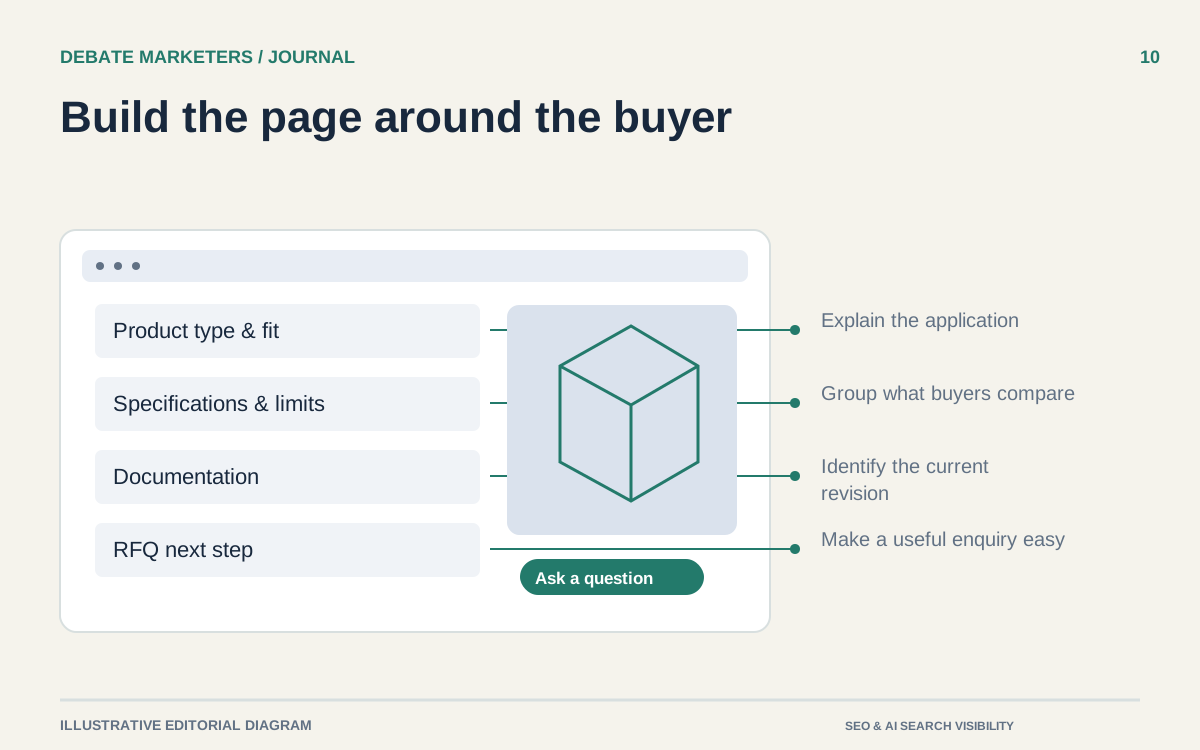
A product page can contain a photograph, a specifications table and a quote button while still leaving a buyer unable to decide whether to proceed.
The missing piece is often the explanation between those elements. What is this product for? Which configuration fits the application? Which conditions change the answer? What should the buyer send before anyone can give a responsible recommendation?
An industrial product page should make those decisions easier. Start with one important product family and build the page around the questions a competent salesperson would ask and answer.
Name the product in the buyer's language
Use the accepted product type alongside the model or family name. An internal series code may be useful to existing customers, but a new buyer needs a category they recognize.
The opening should establish application and scope. Explain the task the product performs, its intended environment and the main variables that determine fit. Leave broad company history for a more appropriate page.
Illustrative opening for a fictional product family: “Adjustable conveyor guides for packaging lines with changing container widths. Choose the mounting arrangement and guide material for your line; confirm compatibility with your operating and cleaning conditions before ordering.”
That example supplies a purpose and a decision path. It does not invent a performance guarantee or imply that every configuration suits every line.
Organize specifications around decisions
Do not ask a buyer to interpret a dense table without context. Group specifications by the decisions they support: dimensions and interfaces, materials, operating conditions, available options and documentation.
Keep units explicit. If you provide both customary and metric units, have the conversions and rounding checked. Distinguish a nominal dimension from a permitted range or tolerance. Identify whether a value applies to the whole family or a particular configuration.
Explain the consequences that your technical team can support. A mounting dimension matters because it affects the buyer's interface. A material option matters because the application may require a different compatibility review. Avoid adding benefit claims simply because a table looks dry.
Use real table structure for tabular information rather than an image of a spreadsheet. W3C's guidance explains how properly structured tables communicate relationships beyond the visual grid. W3C content structure guidance
Make limitations easy to find
A qualification hidden in a download is easily missed. Place material restrictions near the claim they qualify.
If performance depends on installation, duty cycle, media, finish or another condition, explain the dependency in language a buyer can act on. Where individual assessment is necessary, say what information the team needs for that assessment.
Do not turn a typical example into a universal specification. Keep tested values, design targets and customer-specific configurations clearly distinct. If the source documentation is incomplete, resolve it before publication or use narrower wording.
Useful limitations help suitable buyers prepare a better inquiry. They also give unsuitable buyers an early opportunity to choose another route.
Show evidence that answers a question
Every visual and download should earn its place. A dimensional drawing can answer an interface question. An annotated photograph can identify connection points. A comparison between configurations can explain what changes and what stays the same.
Use current filenames and revision details for downloadable documents. Make the connection between the document and the product explicit. A buyer should not need to open several nearly identical PDFs to discover which one applies.
For certifications, publish only approved claims with the correct scope. For application photographs, use assets you have permission to publish and captions that accurately describe what is shown. A dramatic factory image cannot substitute for product evidence.
Google's content guidance asks whether a page supplies original value and enough information to help its intended reader achieve a goal. That is a useful editorial check, without being a ranking promise. Google's people-first content guidance
Answer the purchasing questions honestly
Explain what is standard, what is configurable and what requires discussion. Include purchasing information your team can reliably maintain, such as the inquiry process, available documentation and the inputs needed for a quotation.
Do not publish a lead time simply because buyers want one. If timing varies, explain which factors affect it and when it will be confirmed. Apply the same discipline to availability, minimum quantities and custom engineering.
The action should match the situation. “Request a quote” suits a buyer who can describe a requirement. “Discuss application fit” may be clearer when product selection needs technical input. Neither button should conceal the actual next step.
Review the page with a real task
Give someone unfamiliar with the product a defined task: identify a suitable configuration, find the relevant drawing and prepare an inquiry. Observe where they hesitate. Then have the technical owner verify the answers and qualifications.
Make a short record of unresolved questions, rather than filling gaps with confident wording. Once approved, assign responsibility for future product changes so the page does not drift away from the documentation.
If your product pages need coordinated writing, design and implementation, talk with Debate Marketers about working with a shared, multidisciplinary managed team.
We plan and run admissions campaigns, websites, SEO and AI search, ads and CRM follow-up for schools, manufacturers and growing brands, from teams in New Delhi and Malta.
Published 3 October 2026.
More articles

How to Find Buyers for Export: Marketing and Branding That Win Orders
How import and export companies find buyers in 2026: buyer finder tools, trade data, B2B portals, LinkedIn and AI search, and the branding that wins orders.

AEO and GEO Best Practices for 2026: A Guide for B2B and Retail
What Google, Microsoft and OpenAI say about AEO and GEO, what studies show gets cited, and best practices for B2B pages, product feeds and measurement in 2026.

How to Choose an SEO Agency in 2026: A B2B and Retail Checklist
What to ask an SEO agency, how to score proposals, what AEO and GEO work should cover, what SEO costs in 2026 and the contract terms to agree before signing.
How to Write Industrial Product Pages That Answer Buyer Questions
Build industrial product pages around application fit, specifications, evidence and RFQ requirements, with a practical writing and review process.
A product page can contain a photograph, a specifications table and a quote button while still leaving a buyer unable to decide whether to proceed.
The missing piece is often the explanation between those elements. What is this product for? Which configuration fits the application? Which conditions change the answer? What should the buyer send before anyone can give a responsible recommendation?
An industrial product page should make those decisions easier. Start with one important product family and build the page around the questions a competent salesperson would ask and answer.
Name the product in the buyer's language
Use the accepted product type alongside the model or family name. An internal series code may be useful to existing customers, but a new buyer needs a category they recognize.
The opening should establish application and scope. Explain the task the product performs, its intended environment and the main variables that determine fit. Leave broad company history for a more appropriate page.
Illustrative opening for a fictional product family: “Adjustable conveyor guides for packaging lines with changing container widths. Choose the mounting arrangement and guide material for your line; confirm compatibility with your operating and cleaning conditions before ordering.”
That example supplies a purpose and a decision path. It does not invent a performance guarantee or imply that every configuration suits every line.
Organize specifications around decisions
Do not ask a buyer to interpret a dense table without context. Group specifications by the decisions they support: dimensions and interfaces, materials, operating conditions, available options and documentation.
Keep units explicit. If you provide both customary and metric units, have the conversions and rounding checked. Distinguish a nominal dimension from a permitted range or tolerance. Identify whether a value applies to the whole family or a particular configuration.
Explain the consequences that your technical team can support. A mounting dimension matters because it affects the buyer's interface. A material option matters because the application may require a different compatibility review. Avoid adding benefit claims simply because a table looks dry.
Use real table structure for tabular information rather than an image of a spreadsheet. W3C's guidance explains how properly structured tables communicate relationships beyond the visual grid. W3C content structure guidance
Make limitations easy to find
A qualification hidden in a download is easily missed. Place material restrictions near the claim they qualify.
If performance depends on installation, duty cycle, media, finish or another condition, explain the dependency in language a buyer can act on. Where individual assessment is necessary, say what information the team needs for that assessment.
Do not turn a typical example into a universal specification. Keep tested values, design targets and customer-specific configurations clearly distinct. If the source documentation is incomplete, resolve it before publication or use narrower wording.
Useful limitations help suitable buyers prepare a better inquiry. They also give unsuitable buyers an early opportunity to choose another route.
Show evidence that answers a question
Every visual and download should earn its place. A dimensional drawing can answer an interface question. An annotated photograph can identify connection points. A comparison between configurations can explain what changes and what stays the same.
Use current filenames and revision details for downloadable documents. Make the connection between the document and the product explicit. A buyer should not need to open several nearly identical PDFs to discover which one applies.
For certifications, publish only approved claims with the correct scope. For application photographs, use assets you have permission to publish and captions that accurately describe what is shown. A dramatic factory image cannot substitute for product evidence.
Google's content guidance asks whether a page supplies original value and enough information to help its intended reader achieve a goal. That is a useful editorial check, without being a ranking promise. Google's people-first content guidance
Answer the purchasing questions honestly
Explain what is standard, what is configurable and what requires discussion. Include purchasing information your team can reliably maintain, such as the inquiry process, available documentation and the inputs needed for a quotation.
Do not publish a lead time simply because buyers want one. If timing varies, explain which factors affect it and when it will be confirmed. Apply the same discipline to availability, minimum quantities and custom engineering.
The action should match the situation. “Request a quote” suits a buyer who can describe a requirement. “Discuss application fit” may be clearer when product selection needs technical input. Neither button should conceal the actual next step.
Review the page with a real task
Give someone unfamiliar with the product a defined task: identify a suitable configuration, find the relevant drawing and prepare an inquiry. Observe where they hesitate. Then have the technical owner verify the answers and qualifications.
Make a short record of unresolved questions, rather than filling gaps with confident wording. Once approved, assign responsibility for future product changes so the page does not drift away from the documentation.
If your product pages need coordinated writing, design and implementation, talk with Debate Marketers about working with a shared, multidisciplinary managed team.
We plan and run admissions campaigns, websites, SEO and AI search, ads and CRM follow-up for schools, manufacturers and growing brands, from teams in New Delhi and Malta.
Published 3 October 2026.
More articles
How to Find Buyers for Export: Marketing and Branding That Win Orders
How import and export companies find buyers in 2026: buyer finder tools, trade data, B2B portals, LinkedIn and AI search, and the branding that wins orders.
AEO and GEO Best Practices for 2026: A Guide for B2B and Retail
What Google, Microsoft and OpenAI say about AEO and GEO, what studies show gets cited, and best practices for B2B pages, product feeds and measurement in 2026.
How to Choose an SEO Agency in 2026: A B2B and Retail Checklist
What to ask an SEO agency, how to score proposals, what AEO and GEO work should cover, what SEO costs in 2026 and the contract terms to agree before signing.
How to Write Industrial Product Pages That Answer Buyer Questions
Build industrial product pages around application fit, specifications, evidence and RFQ requirements, with a practical writing and review process.
A product page can contain a photograph, a specifications table and a quote button while still leaving a buyer unable to decide whether to proceed.
The missing piece is often the explanation between those elements. What is this product for? Which configuration fits the application? Which conditions change the answer? What should the buyer send before anyone can give a responsible recommendation?
An industrial product page should make those decisions easier. Start with one important product family and build the page around the questions a competent salesperson would ask and answer.
Name the product in the buyer's language
Use the accepted product type alongside the model or family name. An internal series code may be useful to existing customers, but a new buyer needs a category they recognize.
The opening should establish application and scope. Explain the task the product performs, its intended environment and the main variables that determine fit. Leave broad company history for a more appropriate page.
Illustrative opening for a fictional product family: “Adjustable conveyor guides for packaging lines with changing container widths. Choose the mounting arrangement and guide material for your line; confirm compatibility with your operating and cleaning conditions before ordering.”
That example supplies a purpose and a decision path. It does not invent a performance guarantee or imply that every configuration suits every line.
Organize specifications around decisions
Do not ask a buyer to interpret a dense table without context. Group specifications by the decisions they support: dimensions and interfaces, materials, operating conditions, available options and documentation.
Keep units explicit. If you provide both customary and metric units, have the conversions and rounding checked. Distinguish a nominal dimension from a permitted range or tolerance. Identify whether a value applies to the whole family or a particular configuration.
Explain the consequences that your technical team can support. A mounting dimension matters because it affects the buyer's interface. A material option matters because the application may require a different compatibility review. Avoid adding benefit claims simply because a table looks dry.
Use real table structure for tabular information rather than an image of a spreadsheet. W3C's guidance explains how properly structured tables communicate relationships beyond the visual grid. W3C content structure guidance
Make limitations easy to find
A qualification hidden in a download is easily missed. Place material restrictions near the claim they qualify.
If performance depends on installation, duty cycle, media, finish or another condition, explain the dependency in language a buyer can act on. Where individual assessment is necessary, say what information the team needs for that assessment.
Do not turn a typical example into a universal specification. Keep tested values, design targets and customer-specific configurations clearly distinct. If the source documentation is incomplete, resolve it before publication or use narrower wording.
Useful limitations help suitable buyers prepare a better inquiry. They also give unsuitable buyers an early opportunity to choose another route.
Show evidence that answers a question
Every visual and download should earn its place. A dimensional drawing can answer an interface question. An annotated photograph can identify connection points. A comparison between configurations can explain what changes and what stays the same.
Use current filenames and revision details for downloadable documents. Make the connection between the document and the product explicit. A buyer should not need to open several nearly identical PDFs to discover which one applies.
For certifications, publish only approved claims with the correct scope. For application photographs, use assets you have permission to publish and captions that accurately describe what is shown. A dramatic factory image cannot substitute for product evidence.
Google's content guidance asks whether a page supplies original value and enough information to help its intended reader achieve a goal. That is a useful editorial check, without being a ranking promise. Google's people-first content guidance
Answer the purchasing questions honestly
Explain what is standard, what is configurable and what requires discussion. Include purchasing information your team can reliably maintain, such as the inquiry process, available documentation and the inputs needed for a quotation.
Do not publish a lead time simply because buyers want one. If timing varies, explain which factors affect it and when it will be confirmed. Apply the same discipline to availability, minimum quantities and custom engineering.
The action should match the situation. “Request a quote” suits a buyer who can describe a requirement. “Discuss application fit” may be clearer when product selection needs technical input. Neither button should conceal the actual next step.
Review the page with a real task
Give someone unfamiliar with the product a defined task: identify a suitable configuration, find the relevant drawing and prepare an inquiry. Observe where they hesitate. Then have the technical owner verify the answers and qualifications.
Make a short record of unresolved questions, rather than filling gaps with confident wording. Once approved, assign responsibility for future product changes so the page does not drift away from the documentation.
If your product pages need coordinated writing, design and implementation, talk with Debate Marketers about working with a shared, multidisciplinary managed team.
We plan and run admissions campaigns, websites, SEO and AI search, ads and CRM follow-up for schools, manufacturers and growing brands, from teams in New Delhi and Malta.
Published 3 October 2026.
More articles
How to Find Buyers for Export: Marketing and Branding That Win Orders
How import and export companies find buyers in 2026: buyer finder tools, trade data, B2B portals, LinkedIn and AI search, and the branding that wins orders.
AEO and GEO Best Practices for 2026: A Guide for B2B and Retail
What Google, Microsoft and OpenAI say about AEO and GEO, what studies show gets cited, and best practices for B2B pages, product feeds and measurement in 2026.
How to Choose an SEO Agency in 2026: A B2B and Retail Checklist
What to ask an SEO agency, how to score proposals, what AEO and GEO work should cover, what SEO costs in 2026 and the contract terms to agree before signing.
Bring your first priority.
Bring one problem: a brand that's drifted, a website that doesn't sell or enquiries going nowhere. We'll spend 30 minutes finding the first fix.
Projects & shared-team retainers
Bring your first priority.
Bring one problem: a brand that's drifted, a website that doesn't sell or enquiries going nowhere. We'll spend 30 minutes finding the first fix.
Projects & shared-team retainers