Marketers
A shared team for strategy, copy, design and campaigns, every month.
Website developmentCapability pages, useful proof and a direct path to an enquiry.
BrandingPositioning, identity and sales material that explain why you're worth choosing.
SEO and AI searchGet found on Google and in AI answers by the people who buy what you make.
Performance marketingGoogle, LinkedIn and Meta ads measured on qualified enquiries.
AI automation & CRMEvery enquiry gets an owner and a next step, with human review.
 Two minutes, no email neededFind the one thing to fix firstTake the quiz→
A Manageable LinkedIn Content System for Manufacturing Teams
Plan manufacturing LinkedIn content around buyer questions, practical source gathering, clear approvals, and measures beyond post volume.
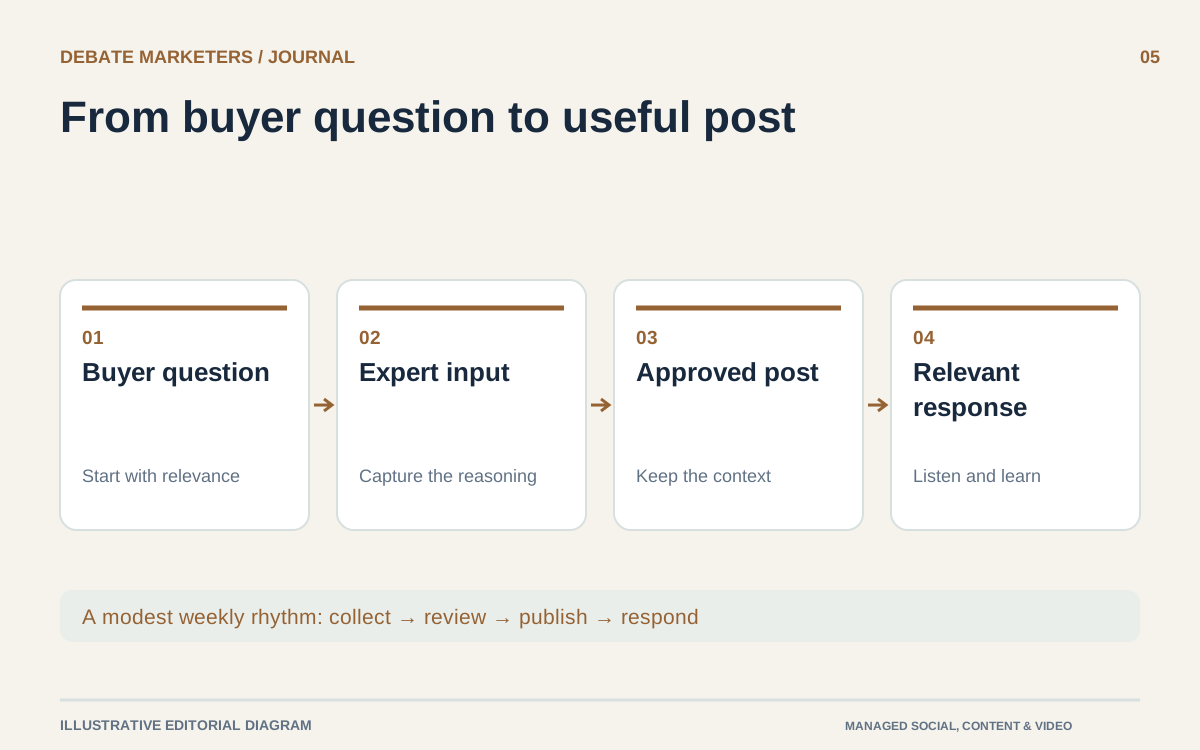
A manufacturing company does not need to behave like a newsroom to maintain a useful LinkedIn presence. It needs a dependable way to turn real questions and available expertise into posts that someone can understand and trust.
The difficult part is usually not finding another content idea. It is gathering the right input, confirming that it can be shared, getting it approved, and doing those things again when production is busy. Build the system around that reality.
Choose a job for the channel
Decide what LinkedIn should help your business do. You might want relevant buyers to understand a capability, give salespeople useful explanations to share, or make the business more familiar to prospective employees.
You can support more than one audience, but each post should have a clear reader and purpose. An engineering explanation and a recruitment update should not be evaluated as though they were trying to produce the same response.
Start with one primary commercial audience. Describe its responsibilities and recurring questions in plain terms. “Maintenance managers evaluating replacement components” is more useful for planning than “B2B decision-makers.”
Use repeatable subjects instead of a blank calendar
Build a small set of recurring subjects from the work already happening inside the business. Useful starting points include application decisions, process explanations, product comparisons, and questions that sales repeatedly answers.
For each subject, record a question, a source person, an available visual, and the next useful step for the reader. An empty calendar becomes easier to fill when each idea already has a route to evidence.
Illustrative example: a fictional industrial pump manufacturer might develop separate posts about information needed for an initial application review, a visible feature on one model, and how its team organizes approved service documentation. It should not publish operating advice that its technical team has not checked.
Keep company announcements in the mix when they matter. Avoid relying on them to carry the entire channel between product launches and trade shows.
Create a small input routine
Ask one person to collect potential topics throughout the month. Sales questions, approved photographs, and notes from product specialists can go into a shared working list with their sources attached.
Hold a brief editorial conversation at a predictable time. Instead of asking engineers to write polished posts, ask them to explain the question, show the relevant material, and identify what a buyer might misunderstand.
The writer's job is to make that explanation accessible. The specialist's job is to verify that the simplified version preserves its meaning and limits.
Agree what can be photographed and shared before requesting assets. Remove confidential information through the approved process, and check backgrounds for customer parts, screens, drawings, and identification details. A useful content routine should not depend on casually exposing work that belongs to someone else.
Set a cadence you can actually support
Choose a publishing rhythm based on available evidence and review capacity. As an illustrative starting plan, a team might prepare two posts a week: one answer to a buyer question and one visual explanation. That is a manageable test for some teams, not a claim about the best frequency for LinkedIn.
Build a short reserve of approved evergreen posts so a busy production week does not force rushed claims. Keep time-sensitive announcements separate and check them again close to publication.
LinkedIn allows Page super admins and content admins to schedule supported posts, although some post types cannot be scheduled. Confirm the current options in the Page before building the workflow around a particular format. LinkedIn Page scheduling guidance
A scheduler handles timing. It does not confirm that an old product detail remains accurate or that a scheduled announcement is still appropriate.
Assign ownership beyond publishing
Name the person who prepares the post, the person who verifies technical details, and the person authorized to publish. Keep comments and revisions in one place so approval refers to the same caption and visual.
Also decide who checks replies. A technical question should reach the right specialist; a purchasing inquiry should reach sales. Do not let the public thread become an unofficial channel for confidential specifications or project files.
A shared multidisciplinary managed team can support writing, design, editing, and coordination. Your internal experts still need to supply accurate product knowledge and approve consequential statements. That division makes the workload visible instead of assuming an outside team can infer everything.
Review usefulness alongside platform numbers
LinkedIn Page analytics includes measures such as impressions, clicks, reactions, comments, and reposts; its impression figures are estimates. Use these to inspect patterns, not as a direct substitute for sales outcomes. LinkedIn content analytics
Track practical signals too: questions from relevant people, posts sales chose to share, visits to useful resources, and inquiries that can be connected to the content. Keep paid and organic activity distinguishable when reviewing results.
Retain the subjects that help the intended audience and improve those that remain unclear. If keeping that cycle moving is the bottleneck, talk with Debate Marketers about managed content support built around your team's actual capacity.
We plan and run admissions campaigns, websites, SEO and AI search, ads and CRM follow-up for schools, manufacturers and growing brands, from teams in New Delhi and Malta.
Published 3 October 2026.
More articles

How to Find Buyers for Export: Marketing and Branding That Win Orders
How import and export companies find buyers in 2026: buyer finder tools, trade data, B2B portals, LinkedIn and AI search, and the branding that wins orders.

AEO and GEO Best Practices for 2026: A Guide for B2B and Retail
What Google, Microsoft and OpenAI say about AEO and GEO, what studies show gets cited, and best practices for B2B pages, product feeds and measurement in 2026.

How to Choose an SEO Agency in 2026: A B2B and Retail Checklist
What to ask an SEO agency, how to score proposals, what AEO and GEO work should cover, what SEO costs in 2026 and the contract terms to agree before signing.
A Manageable LinkedIn Content System for Manufacturing Teams
Plan manufacturing LinkedIn content around buyer questions, practical source gathering, clear approvals, and measures beyond post volume.
A manufacturing company does not need to behave like a newsroom to maintain a useful LinkedIn presence. It needs a dependable way to turn real questions and available expertise into posts that someone can understand and trust.
The difficult part is usually not finding another content idea. It is gathering the right input, confirming that it can be shared, getting it approved, and doing those things again when production is busy. Build the system around that reality.
Choose a job for the channel
Decide what LinkedIn should help your business do. You might want relevant buyers to understand a capability, give salespeople useful explanations to share, or make the business more familiar to prospective employees.
You can support more than one audience, but each post should have a clear reader and purpose. An engineering explanation and a recruitment update should not be evaluated as though they were trying to produce the same response.
Start with one primary commercial audience. Describe its responsibilities and recurring questions in plain terms. “Maintenance managers evaluating replacement components” is more useful for planning than “B2B decision-makers.”
Use repeatable subjects instead of a blank calendar
Build a small set of recurring subjects from the work already happening inside the business. Useful starting points include application decisions, process explanations, product comparisons, and questions that sales repeatedly answers.
For each subject, record a question, a source person, an available visual, and the next useful step for the reader. An empty calendar becomes easier to fill when each idea already has a route to evidence.
Illustrative example: a fictional industrial pump manufacturer might develop separate posts about information needed for an initial application review, a visible feature on one model, and how its team organizes approved service documentation. It should not publish operating advice that its technical team has not checked.
Keep company announcements in the mix when they matter. Avoid relying on them to carry the entire channel between product launches and trade shows.
Create a small input routine
Ask one person to collect potential topics throughout the month. Sales questions, approved photographs, and notes from product specialists can go into a shared working list with their sources attached.
Hold a brief editorial conversation at a predictable time. Instead of asking engineers to write polished posts, ask them to explain the question, show the relevant material, and identify what a buyer might misunderstand.
The writer's job is to make that explanation accessible. The specialist's job is to verify that the simplified version preserves its meaning and limits.
Agree what can be photographed and shared before requesting assets. Remove confidential information through the approved process, and check backgrounds for customer parts, screens, drawings, and identification details. A useful content routine should not depend on casually exposing work that belongs to someone else.
Set a cadence you can actually support
Choose a publishing rhythm based on available evidence and review capacity. As an illustrative starting plan, a team might prepare two posts a week: one answer to a buyer question and one visual explanation. That is a manageable test for some teams, not a claim about the best frequency for LinkedIn.
Build a short reserve of approved evergreen posts so a busy production week does not force rushed claims. Keep time-sensitive announcements separate and check them again close to publication.
LinkedIn allows Page super admins and content admins to schedule supported posts, although some post types cannot be scheduled. Confirm the current options in the Page before building the workflow around a particular format. LinkedIn Page scheduling guidance
A scheduler handles timing. It does not confirm that an old product detail remains accurate or that a scheduled announcement is still appropriate.
Assign ownership beyond publishing
Name the person who prepares the post, the person who verifies technical details, and the person authorized to publish. Keep comments and revisions in one place so approval refers to the same caption and visual.
Also decide who checks replies. A technical question should reach the right specialist; a purchasing inquiry should reach sales. Do not let the public thread become an unofficial channel for confidential specifications or project files.
A shared multidisciplinary managed team can support writing, design, editing, and coordination. Your internal experts still need to supply accurate product knowledge and approve consequential statements. That division makes the workload visible instead of assuming an outside team can infer everything.
Review usefulness alongside platform numbers
LinkedIn Page analytics includes measures such as impressions, clicks, reactions, comments, and reposts; its impression figures are estimates. Use these to inspect patterns, not as a direct substitute for sales outcomes. LinkedIn content analytics
Track practical signals too: questions from relevant people, posts sales chose to share, visits to useful resources, and inquiries that can be connected to the content. Keep paid and organic activity distinguishable when reviewing results.
Retain the subjects that help the intended audience and improve those that remain unclear. If keeping that cycle moving is the bottleneck, talk with Debate Marketers about managed content support built around your team's actual capacity.
We plan and run admissions campaigns, websites, SEO and AI search, ads and CRM follow-up for schools, manufacturers and growing brands, from teams in New Delhi and Malta.
Published 3 October 2026.
More articles
How to Find Buyers for Export: Marketing and Branding That Win Orders
How import and export companies find buyers in 2026: buyer finder tools, trade data, B2B portals, LinkedIn and AI search, and the branding that wins orders.
AEO and GEO Best Practices for 2026: A Guide for B2B and Retail
What Google, Microsoft and OpenAI say about AEO and GEO, what studies show gets cited, and best practices for B2B pages, product feeds and measurement in 2026.
How to Choose an SEO Agency in 2026: A B2B and Retail Checklist
What to ask an SEO agency, how to score proposals, what AEO and GEO work should cover, what SEO costs in 2026 and the contract terms to agree before signing.
A Manageable LinkedIn Content System for Manufacturing Teams
Plan manufacturing LinkedIn content around buyer questions, practical source gathering, clear approvals, and measures beyond post volume.
A manufacturing company does not need to behave like a newsroom to maintain a useful LinkedIn presence. It needs a dependable way to turn real questions and available expertise into posts that someone can understand and trust.
The difficult part is usually not finding another content idea. It is gathering the right input, confirming that it can be shared, getting it approved, and doing those things again when production is busy. Build the system around that reality.
Choose a job for the channel
Decide what LinkedIn should help your business do. You might want relevant buyers to understand a capability, give salespeople useful explanations to share, or make the business more familiar to prospective employees.
You can support more than one audience, but each post should have a clear reader and purpose. An engineering explanation and a recruitment update should not be evaluated as though they were trying to produce the same response.
Start with one primary commercial audience. Describe its responsibilities and recurring questions in plain terms. “Maintenance managers evaluating replacement components” is more useful for planning than “B2B decision-makers.”
Use repeatable subjects instead of a blank calendar
Build a small set of recurring subjects from the work already happening inside the business. Useful starting points include application decisions, process explanations, product comparisons, and questions that sales repeatedly answers.
For each subject, record a question, a source person, an available visual, and the next useful step for the reader. An empty calendar becomes easier to fill when each idea already has a route to evidence.
Illustrative example: a fictional industrial pump manufacturer might develop separate posts about information needed for an initial application review, a visible feature on one model, and how its team organizes approved service documentation. It should not publish operating advice that its technical team has not checked.
Keep company announcements in the mix when they matter. Avoid relying on them to carry the entire channel between product launches and trade shows.
Create a small input routine
Ask one person to collect potential topics throughout the month. Sales questions, approved photographs, and notes from product specialists can go into a shared working list with their sources attached.
Hold a brief editorial conversation at a predictable time. Instead of asking engineers to write polished posts, ask them to explain the question, show the relevant material, and identify what a buyer might misunderstand.
The writer's job is to make that explanation accessible. The specialist's job is to verify that the simplified version preserves its meaning and limits.
Agree what can be photographed and shared before requesting assets. Remove confidential information through the approved process, and check backgrounds for customer parts, screens, drawings, and identification details. A useful content routine should not depend on casually exposing work that belongs to someone else.
Set a cadence you can actually support
Choose a publishing rhythm based on available evidence and review capacity. As an illustrative starting plan, a team might prepare two posts a week: one answer to a buyer question and one visual explanation. That is a manageable test for some teams, not a claim about the best frequency for LinkedIn.
Build a short reserve of approved evergreen posts so a busy production week does not force rushed claims. Keep time-sensitive announcements separate and check them again close to publication.
LinkedIn allows Page super admins and content admins to schedule supported posts, although some post types cannot be scheduled. Confirm the current options in the Page before building the workflow around a particular format. LinkedIn Page scheduling guidance
A scheduler handles timing. It does not confirm that an old product detail remains accurate or that a scheduled announcement is still appropriate.
Assign ownership beyond publishing
Name the person who prepares the post, the person who verifies technical details, and the person authorized to publish. Keep comments and revisions in one place so approval refers to the same caption and visual.
Also decide who checks replies. A technical question should reach the right specialist; a purchasing inquiry should reach sales. Do not let the public thread become an unofficial channel for confidential specifications or project files.
A shared multidisciplinary managed team can support writing, design, editing, and coordination. Your internal experts still need to supply accurate product knowledge and approve consequential statements. That division makes the workload visible instead of assuming an outside team can infer everything.
Review usefulness alongside platform numbers
LinkedIn Page analytics includes measures such as impressions, clicks, reactions, comments, and reposts; its impression figures are estimates. Use these to inspect patterns, not as a direct substitute for sales outcomes. LinkedIn content analytics
Track practical signals too: questions from relevant people, posts sales chose to share, visits to useful resources, and inquiries that can be connected to the content. Keep paid and organic activity distinguishable when reviewing results.
Retain the subjects that help the intended audience and improve those that remain unclear. If keeping that cycle moving is the bottleneck, talk with Debate Marketers about managed content support built around your team's actual capacity.
We plan and run admissions campaigns, websites, SEO and AI search, ads and CRM follow-up for schools, manufacturers and growing brands, from teams in New Delhi and Malta.
Published 3 October 2026.
More articles
How to Find Buyers for Export: Marketing and Branding That Win Orders
How import and export companies find buyers in 2026: buyer finder tools, trade data, B2B portals, LinkedIn and AI search, and the branding that wins orders.
AEO and GEO Best Practices for 2026: A Guide for B2B and Retail
What Google, Microsoft and OpenAI say about AEO and GEO, what studies show gets cited, and best practices for B2B pages, product feeds and measurement in 2026.
How to Choose an SEO Agency in 2026: A B2B and Retail Checklist
What to ask an SEO agency, how to score proposals, what AEO and GEO work should cover, what SEO costs in 2026 and the contract terms to agree before signing.
Bring your first priority.
Bring one problem: a brand that's drifted, a website that doesn't sell or enquiries going nowhere. We'll spend 30 minutes finding the first fix.
Projects & shared-team retainers
Bring your first priority.
Bring one problem: a brand that's drifted, a website that doesn't sell or enquiries going nowhere. We'll spend 30 minutes finding the first fix.
Projects & shared-team retainers