Marketers
A shared team for strategy, copy, design and campaigns, every month.
Website developmentCapability pages, useful proof and a direct path to an enquiry.
BrandingPositioning, identity and sales material that explain why you're worth choosing.
SEO and AI searchGet found on Google and in AI answers by the people who buy what you make.
Performance marketingGoogle, LinkedIn and Meta ads measured on qualified enquiries.
AI automation & CRMEvery enquiry gets an owner and a next step, with human review.
 Two minutes, no email neededFind the one thing to fix firstTake the quiz→
Which Marketing Tasks Should You Automate First?
Prioritize marketing automation using task frequency, stable rules, error consequences, recoverability, and measurable value to the team.
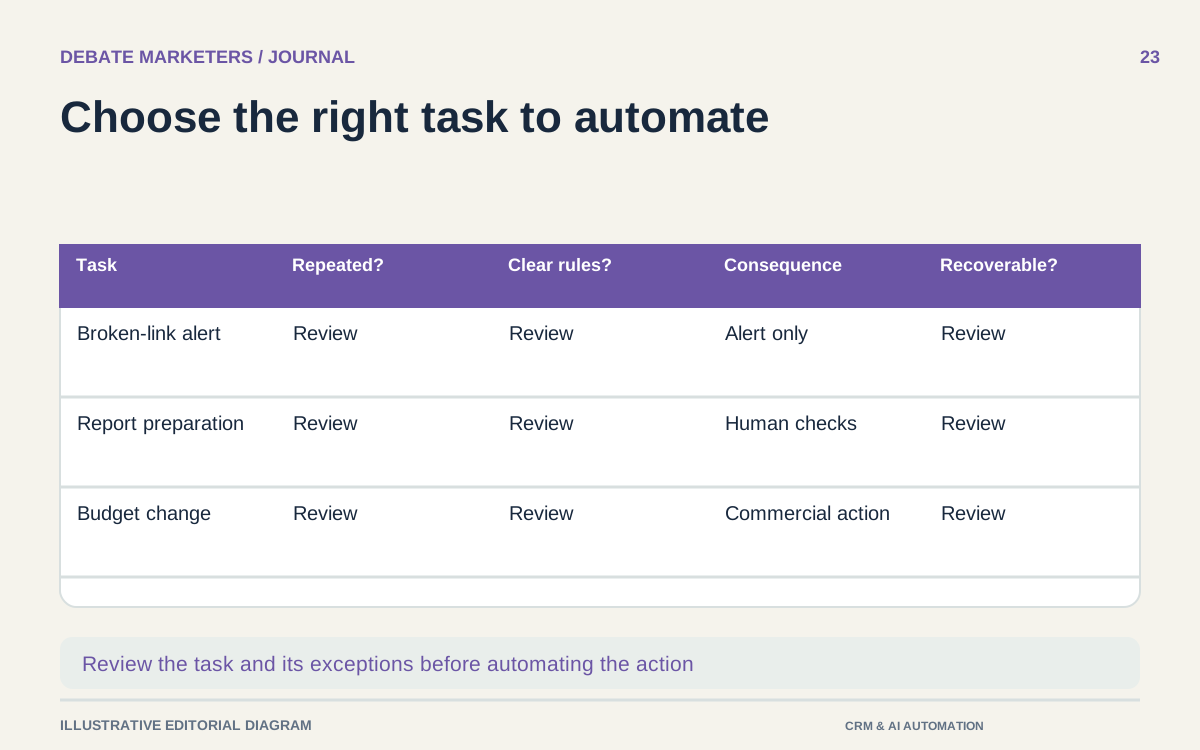
The first marketing task to automate is usually one the team already understands. Its inputs are reasonably consistent, its rules are clear, and someone can recognize when the result is wrong.
Start there. A vague process with many exceptions does not become dependable because software runs it. It can simply create more work before anybody notices.
For an owner-led business, the useful question is which repetitive task can be made more reliable without taking away judgment the business still needs. That question produces a better shortlist than asking where AI could be added.
Inventory the work before choosing a tool
Ask the team to list recurring tasks across campaign operations, content production, reporting, CRM maintenance, and sales coordination. Include the less visible work: checking links, chasing approvals, transferring approved assets, assembling recurring data, and reminding owners about overdue actions.
For each task, record the trigger, inputs, current owner, output, approximate effort, frequency, and common exceptions. Use an observed sample rather than an optimistic estimate of time saved.
Also ask whether the task should exist at all. Removing an unnecessary report or simplifying an approval chain may be more useful than automating it.
Use four practical selection questions
First, is the task repeated often enough to justify setup and maintenance? An occasional inconvenience may not need a workflow.
Second, are the rules stable? If every instance requires a new interpretation of the business objective, the task is better treated as assisted work with review.
Third, what happens when it is wrong? A duplicate internal reminder is inconvenient. An incorrect price sent to a buyer or an unauthorized campaign change can have commercial consequences.
Fourth, can the team detect and reverse the mistake? Prefer a task with visible outputs and a straightforward recovery process for an initial project. These questions are a practical prioritization method, not a mathematical prediction of return.
Distinguish preparation from execution
Many tasks contain both routine work and a judgment step. Separate them before deciding how much to automate.
A system can collect approved campaign data and assemble a draft report while a person interprets the causes. It can check a content calendar for missing assets while an editor decides whether the work is ready. It can prepare a reminder list while the account owner reviews sensitive exceptions.
Do not silently turn permission to prepare into permission to publish, spend, contact customers, or alter commercial terms. Write the approval point into the workflow and make it visible to the people operating it.
Compare a few realistic candidates
Consider an illustrative manufacturer with a small internal marketing team. One candidate is an internal alert when an approved campaign link returns an error. Another is assembling recurring metrics into a draft management report. A third is automatically increasing ad budgets when a target appears to be met.
The first two can be scoped around detection and preparation. The third changes spend and depends on trustworthy measurement, business context, and explicit authority. It deserves a different review even if the automation itself is easy to build.
The initial choice should reflect the actual bottleneck. If reports already take little effort but campaign errors remain unnoticed, report assembly is not automatically the better project.
Write a small operating contract
Before building, describe the workflow in one page: when it starts, what information it uses, what it may change, what it must never do, and who receives exceptions.
Include a stopping condition. A reporting workflow should stop and flag missing data rather than quietly reuse an old number. An approval reminder should end when the work is approved, canceled, or reassigned. Repeated alerts need a limit and an escalation route so they do not become background noise.
Name a maintenance owner. Someone must update the workflow when campaign names, team roles, source systems, or approval requirements change.
Test with ordinary and awkward cases
Test records with missing fields, duplicates, unexpected dates, and unavailable owners. Verify both the normal output and the failure notification. Check what happens when the same event is received twice or an integration is temporarily unavailable.
Use platform testing tools where available. HubSpot, for example, provides tests for enrollment criteria and simulations of a record's path through a workflow; its documentation also notes that tests examine the current workflow version. HubSpot workflow testing guidance
A simulation is one check, not proof that every connected system will behave correctly. Verify the end-to-end result in an appropriately controlled trial.
Measure the burden that remains
After launch, compare the original task with the full new workload: reviewing outputs, correcting exceptions, maintaining rules, and handling failures. Count completed useful work rather than the number of automated steps.
Expand only when the first workflow is dependable and someone can support it. Several narrow, well-owned automations may be easier to maintain than one chain spanning the entire marketing operation.
Talk with Debate Marketers about identifying a practical starting point across marketing, CRM, and reporting, with human approval kept where the business needs it.
We plan and run admissions campaigns, websites, SEO and AI search, ads and CRM follow-up for schools, manufacturers and growing brands, from teams in New Delhi and Malta.
Published 3 October 2026.
More articles

How to Find Buyers for Export: Marketing and Branding That Win Orders
How import and export companies find buyers in 2026: buyer finder tools, trade data, B2B portals, LinkedIn and AI search, and the branding that wins orders.

AEO and GEO Best Practices for 2026: A Guide for B2B and Retail
What Google, Microsoft and OpenAI say about AEO and GEO, what studies show gets cited, and best practices for B2B pages, product feeds and measurement in 2026.

How to Choose an SEO Agency in 2026: A B2B and Retail Checklist
What to ask an SEO agency, how to score proposals, what AEO and GEO work should cover, what SEO costs in 2026 and the contract terms to agree before signing.
Which Marketing Tasks Should You Automate First?
Prioritize marketing automation using task frequency, stable rules, error consequences, recoverability, and measurable value to the team.
The first marketing task to automate is usually one the team already understands. Its inputs are reasonably consistent, its rules are clear, and someone can recognize when the result is wrong.
Start there. A vague process with many exceptions does not become dependable because software runs it. It can simply create more work before anybody notices.
For an owner-led business, the useful question is which repetitive task can be made more reliable without taking away judgment the business still needs. That question produces a better shortlist than asking where AI could be added.
Inventory the work before choosing a tool
Ask the team to list recurring tasks across campaign operations, content production, reporting, CRM maintenance, and sales coordination. Include the less visible work: checking links, chasing approvals, transferring approved assets, assembling recurring data, and reminding owners about overdue actions.
For each task, record the trigger, inputs, current owner, output, approximate effort, frequency, and common exceptions. Use an observed sample rather than an optimistic estimate of time saved.
Also ask whether the task should exist at all. Removing an unnecessary report or simplifying an approval chain may be more useful than automating it.
Use four practical selection questions
First, is the task repeated often enough to justify setup and maintenance? An occasional inconvenience may not need a workflow.
Second, are the rules stable? If every instance requires a new interpretation of the business objective, the task is better treated as assisted work with review.
Third, what happens when it is wrong? A duplicate internal reminder is inconvenient. An incorrect price sent to a buyer or an unauthorized campaign change can have commercial consequences.
Fourth, can the team detect and reverse the mistake? Prefer a task with visible outputs and a straightforward recovery process for an initial project. These questions are a practical prioritization method, not a mathematical prediction of return.
Distinguish preparation from execution
Many tasks contain both routine work and a judgment step. Separate them before deciding how much to automate.
A system can collect approved campaign data and assemble a draft report while a person interprets the causes. It can check a content calendar for missing assets while an editor decides whether the work is ready. It can prepare a reminder list while the account owner reviews sensitive exceptions.
Do not silently turn permission to prepare into permission to publish, spend, contact customers, or alter commercial terms. Write the approval point into the workflow and make it visible to the people operating it.
Compare a few realistic candidates
Consider an illustrative manufacturer with a small internal marketing team. One candidate is an internal alert when an approved campaign link returns an error. Another is assembling recurring metrics into a draft management report. A third is automatically increasing ad budgets when a target appears to be met.
The first two can be scoped around detection and preparation. The third changes spend and depends on trustworthy measurement, business context, and explicit authority. It deserves a different review even if the automation itself is easy to build.
The initial choice should reflect the actual bottleneck. If reports already take little effort but campaign errors remain unnoticed, report assembly is not automatically the better project.
Write a small operating contract
Before building, describe the workflow in one page: when it starts, what information it uses, what it may change, what it must never do, and who receives exceptions.
Include a stopping condition. A reporting workflow should stop and flag missing data rather than quietly reuse an old number. An approval reminder should end when the work is approved, canceled, or reassigned. Repeated alerts need a limit and an escalation route so they do not become background noise.
Name a maintenance owner. Someone must update the workflow when campaign names, team roles, source systems, or approval requirements change.
Test with ordinary and awkward cases
Test records with missing fields, duplicates, unexpected dates, and unavailable owners. Verify both the normal output and the failure notification. Check what happens when the same event is received twice or an integration is temporarily unavailable.
Use platform testing tools where available. HubSpot, for example, provides tests for enrollment criteria and simulations of a record's path through a workflow; its documentation also notes that tests examine the current workflow version. HubSpot workflow testing guidance
A simulation is one check, not proof that every connected system will behave correctly. Verify the end-to-end result in an appropriately controlled trial.
Measure the burden that remains
After launch, compare the original task with the full new workload: reviewing outputs, correcting exceptions, maintaining rules, and handling failures. Count completed useful work rather than the number of automated steps.
Expand only when the first workflow is dependable and someone can support it. Several narrow, well-owned automations may be easier to maintain than one chain spanning the entire marketing operation.
Talk with Debate Marketers about identifying a practical starting point across marketing, CRM, and reporting, with human approval kept where the business needs it.
We plan and run admissions campaigns, websites, SEO and AI search, ads and CRM follow-up for schools, manufacturers and growing brands, from teams in New Delhi and Malta.
Published 3 October 2026.
More articles
How to Find Buyers for Export: Marketing and Branding That Win Orders
How import and export companies find buyers in 2026: buyer finder tools, trade data, B2B portals, LinkedIn and AI search, and the branding that wins orders.
AEO and GEO Best Practices for 2026: A Guide for B2B and Retail
What Google, Microsoft and OpenAI say about AEO and GEO, what studies show gets cited, and best practices for B2B pages, product feeds and measurement in 2026.
How to Choose an SEO Agency in 2026: A B2B and Retail Checklist
What to ask an SEO agency, how to score proposals, what AEO and GEO work should cover, what SEO costs in 2026 and the contract terms to agree before signing.
Which Marketing Tasks Should You Automate First?
Prioritize marketing automation using task frequency, stable rules, error consequences, recoverability, and measurable value to the team.
The first marketing task to automate is usually one the team already understands. Its inputs are reasonably consistent, its rules are clear, and someone can recognize when the result is wrong.
Start there. A vague process with many exceptions does not become dependable because software runs it. It can simply create more work before anybody notices.
For an owner-led business, the useful question is which repetitive task can be made more reliable without taking away judgment the business still needs. That question produces a better shortlist than asking where AI could be added.
Inventory the work before choosing a tool
Ask the team to list recurring tasks across campaign operations, content production, reporting, CRM maintenance, and sales coordination. Include the less visible work: checking links, chasing approvals, transferring approved assets, assembling recurring data, and reminding owners about overdue actions.
For each task, record the trigger, inputs, current owner, output, approximate effort, frequency, and common exceptions. Use an observed sample rather than an optimistic estimate of time saved.
Also ask whether the task should exist at all. Removing an unnecessary report or simplifying an approval chain may be more useful than automating it.
Use four practical selection questions
First, is the task repeated often enough to justify setup and maintenance? An occasional inconvenience may not need a workflow.
Second, are the rules stable? If every instance requires a new interpretation of the business objective, the task is better treated as assisted work with review.
Third, what happens when it is wrong? A duplicate internal reminder is inconvenient. An incorrect price sent to a buyer or an unauthorized campaign change can have commercial consequences.
Fourth, can the team detect and reverse the mistake? Prefer a task with visible outputs and a straightforward recovery process for an initial project. These questions are a practical prioritization method, not a mathematical prediction of return.
Distinguish preparation from execution
Many tasks contain both routine work and a judgment step. Separate them before deciding how much to automate.
A system can collect approved campaign data and assemble a draft report while a person interprets the causes. It can check a content calendar for missing assets while an editor decides whether the work is ready. It can prepare a reminder list while the account owner reviews sensitive exceptions.
Do not silently turn permission to prepare into permission to publish, spend, contact customers, or alter commercial terms. Write the approval point into the workflow and make it visible to the people operating it.
Compare a few realistic candidates
Consider an illustrative manufacturer with a small internal marketing team. One candidate is an internal alert when an approved campaign link returns an error. Another is assembling recurring metrics into a draft management report. A third is automatically increasing ad budgets when a target appears to be met.
The first two can be scoped around detection and preparation. The third changes spend and depends on trustworthy measurement, business context, and explicit authority. It deserves a different review even if the automation itself is easy to build.
The initial choice should reflect the actual bottleneck. If reports already take little effort but campaign errors remain unnoticed, report assembly is not automatically the better project.
Write a small operating contract
Before building, describe the workflow in one page: when it starts, what information it uses, what it may change, what it must never do, and who receives exceptions.
Include a stopping condition. A reporting workflow should stop and flag missing data rather than quietly reuse an old number. An approval reminder should end when the work is approved, canceled, or reassigned. Repeated alerts need a limit and an escalation route so they do not become background noise.
Name a maintenance owner. Someone must update the workflow when campaign names, team roles, source systems, or approval requirements change.
Test with ordinary and awkward cases
Test records with missing fields, duplicates, unexpected dates, and unavailable owners. Verify both the normal output and the failure notification. Check what happens when the same event is received twice or an integration is temporarily unavailable.
Use platform testing tools where available. HubSpot, for example, provides tests for enrollment criteria and simulations of a record's path through a workflow; its documentation also notes that tests examine the current workflow version. HubSpot workflow testing guidance
A simulation is one check, not proof that every connected system will behave correctly. Verify the end-to-end result in an appropriately controlled trial.
Measure the burden that remains
After launch, compare the original task with the full new workload: reviewing outputs, correcting exceptions, maintaining rules, and handling failures. Count completed useful work rather than the number of automated steps.
Expand only when the first workflow is dependable and someone can support it. Several narrow, well-owned automations may be easier to maintain than one chain spanning the entire marketing operation.
Talk with Debate Marketers about identifying a practical starting point across marketing, CRM, and reporting, with human approval kept where the business needs it.
We plan and run admissions campaigns, websites, SEO and AI search, ads and CRM follow-up for schools, manufacturers and growing brands, from teams in New Delhi and Malta.
Published 3 October 2026.
More articles
How to Find Buyers for Export: Marketing and Branding That Win Orders
How import and export companies find buyers in 2026: buyer finder tools, trade data, B2B portals, LinkedIn and AI search, and the branding that wins orders.
AEO and GEO Best Practices for 2026: A Guide for B2B and Retail
What Google, Microsoft and OpenAI say about AEO and GEO, what studies show gets cited, and best practices for B2B pages, product feeds and measurement in 2026.
How to Choose an SEO Agency in 2026: A B2B and Retail Checklist
What to ask an SEO agency, how to score proposals, what AEO and GEO work should cover, what SEO costs in 2026 and the contract terms to agree before signing.
Bring your first priority.
Bring one problem: a brand that's drifted, a website that doesn't sell or enquiries going nowhere. We'll spend 30 minutes finding the first fix.
Projects & shared-team retainers
Bring your first priority.
Bring one problem: a brand that's drifted, a website that doesn't sell or enquiries going nowhere. We'll spend 30 minutes finding the first fix.
Projects & shared-team retainers